
What ScreenZen does well
ScreenZen is the cleanest no-frills version of the pause-at-unlock approach, and it deserves real credit for it. You pick the apps, set a tap-and-hold duration, and that is essentially it. No subscription, no upsell, no notifications begging for your attention. It is open source and donation supported, so there is no business model quietly nudging you toward a paid tier. For a lot of people, that minimal-feature, zero-cost shape is exactly right, and no amount of extra features would improve it for them. If your whole ask is "put a small speed bump in front of Instagram and otherwise leave me alone," ScreenZen answers that better than almost anything.
Where ScreenZen may fall short
The same minimalism that makes ScreenZen great for some people is where it can fall short for others. Because the pause is bare, it can become easy to tune out. After a week or two of tapping and holding through the same blank delay, some users report the friction fading into background noise, and the habit creeps back. There is no progress tracking, no mood or insight view, and nothing that rewards you for sticking with it. The interface is utilitarian by design, so there is nothing that makes you want to open the app, which matters more than it sounds. And while the donation prompts are mild, a few people find them slightly naggy over time. None of this is a flaw so much as a trade-off: ScreenZen chose to do less, on purpose.
You want $0 forever with no subscription, and you would find any extra feature to be clutter. You value open source for transparency and privacy. You are comfortable with a bare-bones interface, want no themes or animations or streaks, and you are confident a simple pause is enough friction for you. If that describes you, ScreenZen is a genuinely excellent fit and you do not need to switch.
You have tried a bare pause before and found yourself tapping through it on autopilot within a couple of weeks. You want the pause to build something, or at least to give you a reason to keep it around. You would like to see progress, track your mood, or open an app that feels calm rather than purely functional. If a blocker only works for you when you actually want to open it, a bare delay may not be enough on its own.
How Pax Gate is different
Pax Gate runs the same kind of pause, but the pause itself does something. Instead of a blank tap-and-hold, you might get a gratitude prompt, a quick noticing exercise, or a small reflection, and the prompts rotate so the moment does not go stale by week three. Over a few weeks, those small moments stack into a real practice you never had to schedule. Pax, a quiet panda companion, lives in the app, waves when you visit, and reacts to your streaks, and there is a sanctuary you can slowly build out and decorate. It sounds minor. It is not, because the thing that kills most blockers after week two is "I do not want to open this app anymore," and Pax Gate is the rare one you might actually look forward to opening. ScreenZen is a wall. Pax Gate is a doorway with a friendly host.
Two honest caveats, so this stays a fair comparison. Pax Gate is free to try, paid for the full experience, whereas ScreenZen is free forever with no paid tier, so on pure price ScreenZen wins. And Pax Gate is Android-first, with iOS planned, while ScreenZen is available on both iOS and Android today. If you are on iPhone right now, ScreenZen is the one you can install this minute, and you can join the Pax Gate waitlist for when the iOS version lands.
See how the pause becomes a practice
Tap any screen to open it full size.
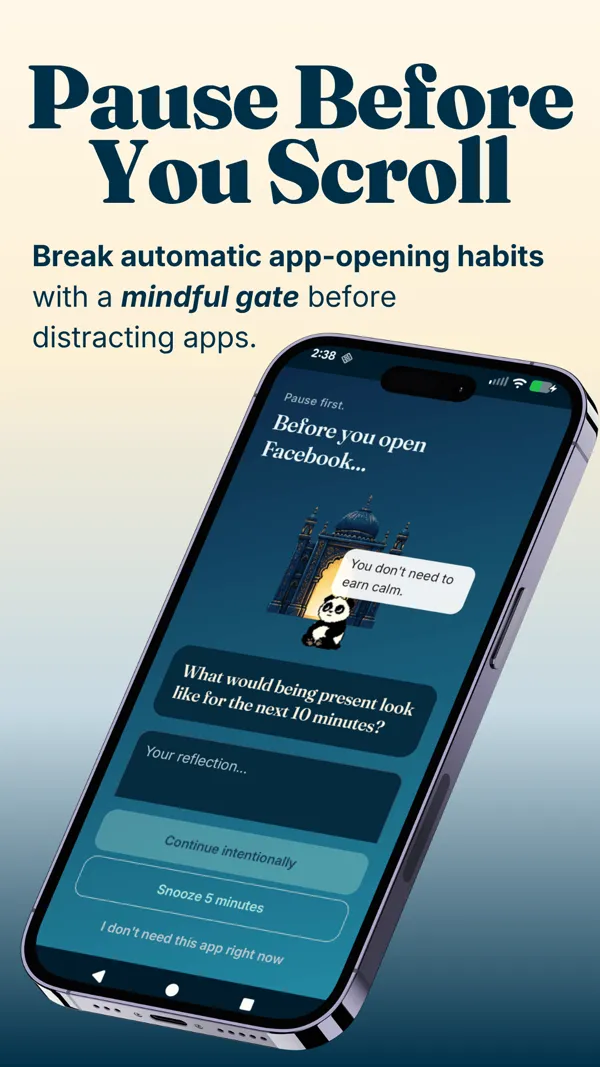
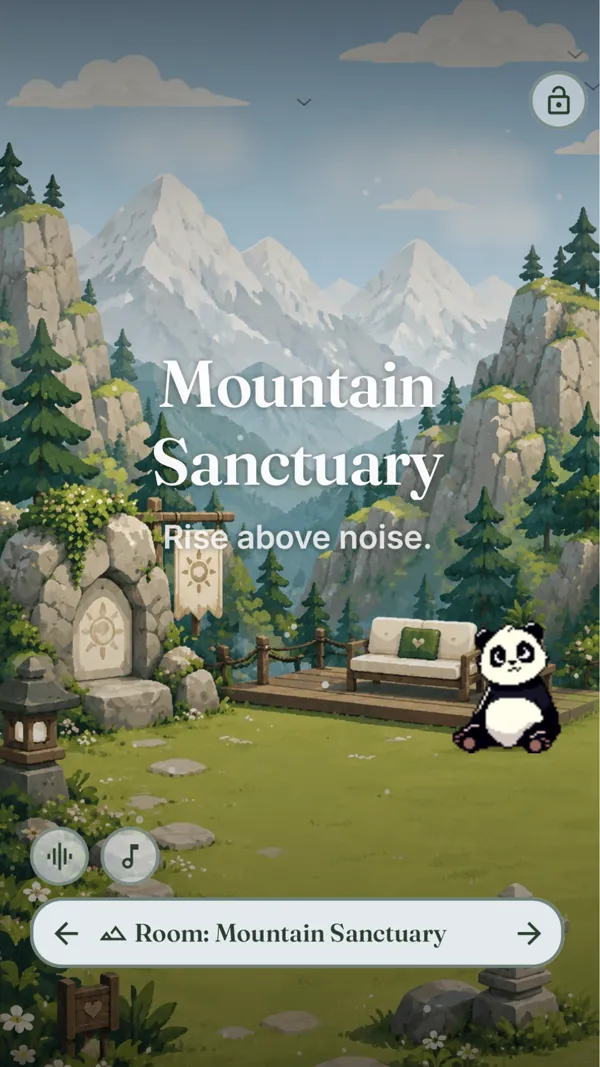
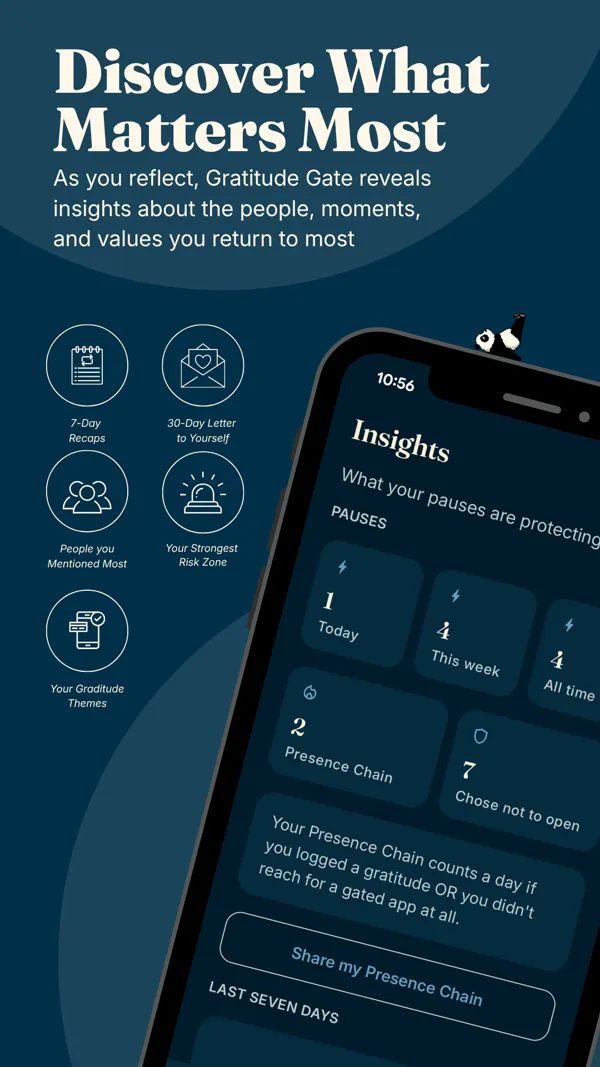
You want the pause to also do something for you: build a gratitude habit, give you a small daily mindfulness moment, and create a sanctuary you enjoy opening. You suspect a bare-bones blocker would be easy to ignore after a week. You want progress tracking, mood insights, and a companion that makes the app something you look forward to rather than dread. You are on Android, or happy to wait for iOS.
Feature comparison
| ScreenZen | Pax Gate | |
|---|---|---|
| Style of friction | Tap-and-hold pause at unlock | Pause at unlock with a gratitude or mindfulness prompt |
| Platforms | iOS and Android | Android first (iOS planned) |
| Cost | Free, donation supported | Free to try; paid for the full experience |
| Practice layer | No | Yes (gratitude, prompts, rituals, sanctuary) |
| Companion | No | Yes (Pax the panda) |
| Aesthetic | Bare bones, utilitarian | Cream and gold, designed to feel calm |
| Stats and mood tracking | Minimal | Yes, with insights |
| Open source | Yes | No |
Best choice by use case
- You want free, open source, and pure friction: ScreenZen. It does exactly that and nothing else, and it does it well.
- You want the pause to build a gratitude or mindfulness habit: Pax Gate. That is the entire point of the practice layer.
- You are on iPhone and want something today: ScreenZen now, and join the Pax Gate waitlist for the iOS release.
- You keep tapping through bare pauses and need a reason to keep going: Pax Gate, whose companion and streaks are built for exactly that drop-off.
- Price is your single deciding factor: ScreenZen, honestly. Free forever is hard to beat.
Try Pax Gate
Join the waitlist for early access. The practice layer (gratitude, prompts, sanctuary, and Pax the panda) is the part you will keep coming back to.
Join the Pax Gate waitlist Android first, iOS planned. We will tell you plainly when your platform is ready.Want to compare more than two apps?
The Pax Gate Comparison Tool puts Pax Gate side by side with ScreenZen, Opal, Forest, and One Sec, with an honest verdict for each.
Open the Comparison ToolCompare other alternatives
FAQ
Is ScreenZen really free?
Yes, genuinely. ScreenZen is open source and donation funded, with no paid tier, so it is free for unlimited apps. That is a real advantage and we will not pretend otherwise. The only catch is occasional donation prompts inside the app, which some people find slightly naggy and others do not mind. If you want zero subscription and nothing beyond the pause, ScreenZen is an excellent, honest choice.
What is the difference between ScreenZen and Pax Gate?
Mechanically they are close cousins: both put a short pause between you and a distracting app at unlock. The difference is what happens during it. ScreenZen gives you a tap-and-hold delay and nothing else, which is exactly what many people want. Pax Gate fills the pause with a rotating prompt (a gratitude note, a small reflection, a noticing exercise, or a check-in with Pax the panda), so the same moment slowly builds a practice instead of just adding friction.
Is Pax Gate free?
Pax Gate is free to try, and paid for the full experience. The free tier gives you the core pause-at-unlock blocker without paying. The paid tier unlocks the parts that make it a practice: themes, prompt packs, sanctuary rooms, rituals, the full journal, and insights. This is an honest difference from ScreenZen, which is free forever. If price is your single deciding factor and you only want the pause, ScreenZen wins on that axis.
Does Pax Gate work on iPhone?
Pax Gate is Android-first, with iOS planned. If you are on Android, you can join the waitlist for early access now. If you are on iPhone, ScreenZen is available today and is a solid choice in the meantime, and you can join the Pax Gate waitlist to be notified when the iOS version arrives. We would rather tell you this plainly than have you download something that is not ready for your phone yet.
Can I switch from ScreenZen to Pax Gate?
Easily. Join the Pax Gate waitlist, install it when it is available on your platform, and migrate one app at a time. The pause will feel familiar, but the moment now does something (a prompt or a check-in) rather than simply delaying you. Most people find the practice settles in after about a week. You can run both briefly while you decide, though for a single app it is usually cleaner to pick one.
Which is better, ScreenZen or Pax Gate?
Neither is universally better; they are built for different people. ScreenZen is better if you want a free, open-source, no-frills pause and would find anything extra to be clutter. Pax Gate is better if you suspect a bare pause would become easy to ignore, and you want it to build something (a gratitude habit, a small ritual, a calmer app you actually want to open). The honest test is whether the practice layer appeals to you or feels like noise.
Is Pax Gate open source like ScreenZen?
No. ScreenZen is open source, which some users specifically value for transparency, and that is a genuine point in its favor. Pax Gate is not open source. It is privacy-minded (the pause and journal are built around your own reflection, not data harvesting), but if open source is a hard requirement for you, ScreenZen is the clear pick on that criterion.