
What Apple Screen Time does well
Apple Screen Time deserves credit, especially for a free tool built into every iPhone. Its usage dashboard is genuinely useful for awareness, breaking your hours down by app and category so you can see where the time actually goes. Its parental controls, delivered through Family Sharing, are among the best available anywhere: a parent can set app limits, schedule Downtime, and apply content restrictions on a child's device from their own phone. Downtime can quiet the whole phone at night. If your goal is awareness or managing a family's devices, Apple Screen Time is comprehensive, well integrated, and costs nothing.
Where Apple Screen Time may fall short
The weakness is specific and well known: for managing your own habits, the limits are too easy to dismiss. When you hit a limit, an Ignore Limit button sits right there, and one more minute becomes one more hour. This is by design, because Screen Time was built as an awareness tool, not an intervention. A time cap tells you that you have spent your budget, but it does nothing to interrupt the reflex that reached for the app in the first place. After a few days, the limit becomes a notification you swipe away without thinking. For an adult who genuinely wants to change the pickup-and-scroll habit, an alert you can ignore in one tap is rarely enough on its own.
You are a parent who wants to manage a child's device, set content restrictions, and use Family Sharing. You want a free, built-in awareness dashboard and nothing extra. You have the self-discipline to respect a soft limit once you have set it. If awareness and parental controls are the job, Apple Screen Time is strong, free, and already on your phone.
You keep tapping Ignore Limit and the cap has stopped meaning anything. You want something that interrupts the moment of opening, not a number you can dismiss. You are trying to change your own reflex, not manage someone else's device. If a limit only works when you already have the willpower to honor it, you may need an intervention that acts at the door of the app rather than after you are already inside.
How Pax Gate is different
Apple Screen Time is a time cap with an easy override. Pax Gate is a pause with a purpose. Instead of showing you that you have hit a limit, Pax Gate intercepts the moment you open a chosen app and gives you a small prompt: a gratitude note, a reflection, a noticing exercise, or a check-in with Pax, the panda companion who lives in the app. There is no Ignore button that makes the friction vanish; there is a short, intentional moment that asks something of you and then lets you choose. The goal is not to shame you with a number. It is to interrupt the reflex and use the moment for something good, so that over weeks the pauses stack into an actual practice.
One honest caveat, stated plainly: Pax Gate is Android-first, with iOS planned, and Apple Screen Time is iOS only. If you are on iPhone today, you cannot install Pax Gate yet. The pause-based options available on iOS right now are ScreenZen and One Sec, and you can join the Pax Gate waitlist to be notified the moment the iOS version arrives. We would rather tell you that than pretend otherwise.
What the pause actually looks like
Tap any screen to open it full size.
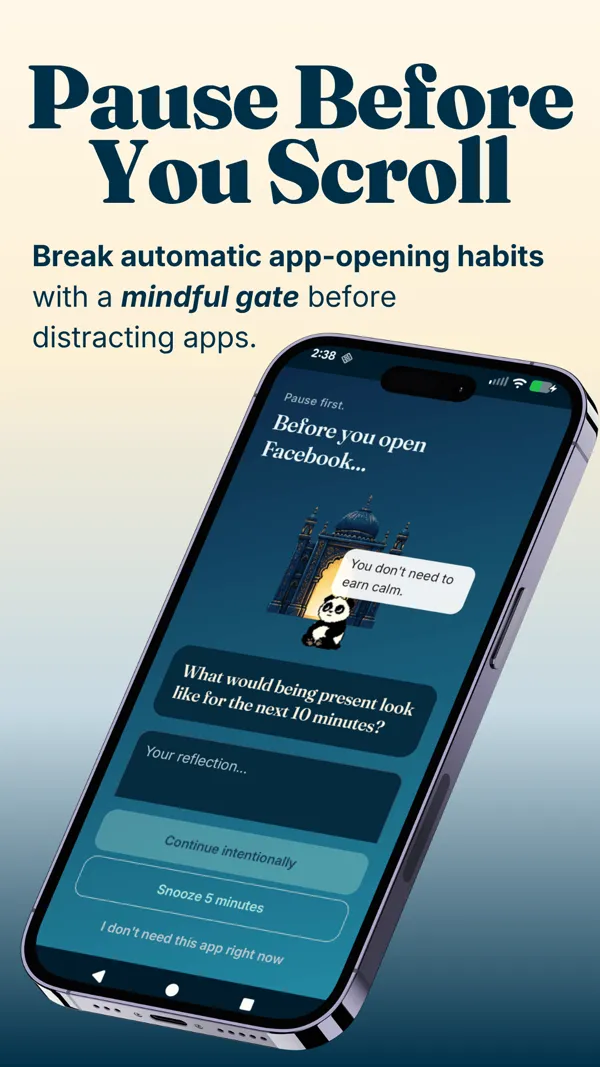
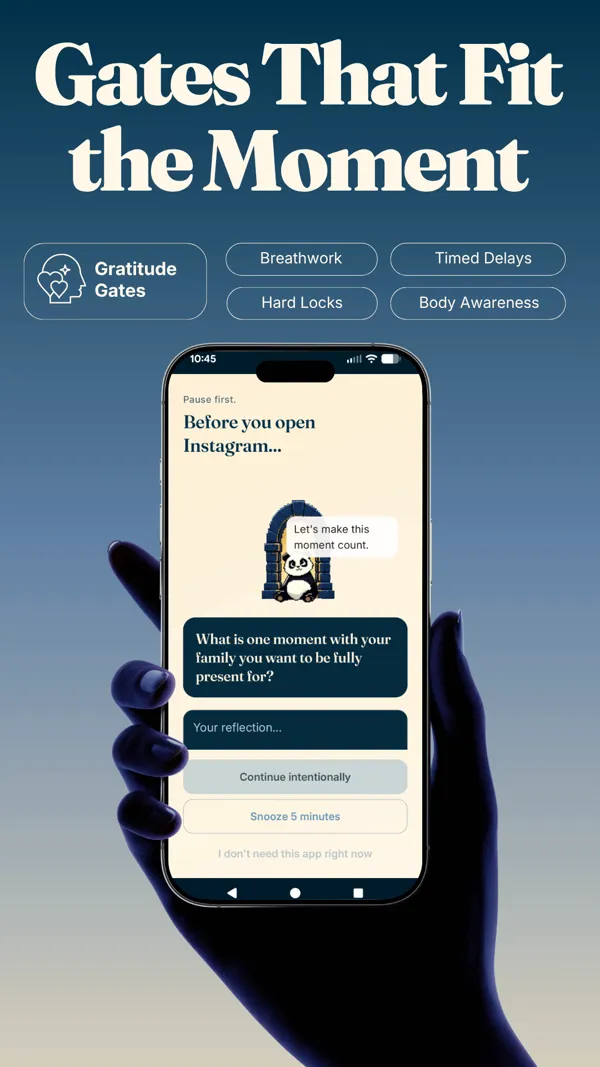
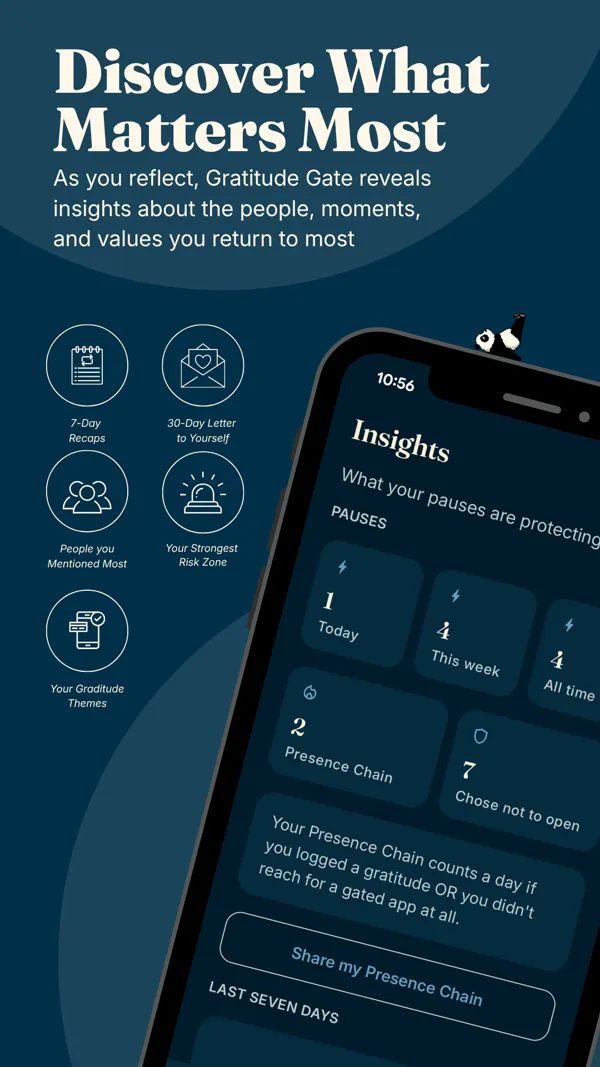
You are an adult who keeps ignoring your own app limits and wants the moment of unlock to become a small reflection instead of a dismissed alert. You want the pause to build a gratitude habit, not just show you a usage number. You would rather be gently interrupted than shamed by a stat. You are on Android, or happy to join the waitlist for iOS.
Feature comparison
| Apple Screen Time | Pax Gate | |
|---|---|---|
| Mechanism | Time limits, Downtime, content restrictions | Pause at unlock with a gratitude or mindfulness prompt |
| Ease of ignoring | One tap (Ignore Limit) | A short pause you move through intentionally |
| Platforms | iOS, built in | Android first (iOS planned) |
| Cost | Free, built into iOS | Free to try; paid for the full experience |
| Parental controls | Yes, strong (Family Sharing) | No; built for your own habits |
| Practice layer | No; awareness dashboard only | Yes (gratitude, prompts, rituals, sanctuary) |
| Companion | No | Yes (Pax the panda) |
| Insights | Usage charts by app | Mood timeline, triggers, screen time saved |
Best choice by use case
- You need parental controls or content filtering: Apple Screen Time. It is genuinely strong here and free, and Pax Gate does not try to replace it.
- You keep tapping Ignore Limit on your own habits: a pause-based app. On Android, Pax Gate; on iOS today, ScreenZen or One Sec while you wait for the Pax Gate iOS release.
- You want the pause to build a gratitude or mindfulness habit: Pax Gate specifically, since that practice layer is the whole point.
- You only want a free awareness dashboard: Apple Screen Time is already on your phone and does that well.
- You are on Android and want an intervention, not a cap: Pax Gate. Join the waitlist for early access.
Try Pax Gate
Join the waitlist for early access. The pause turns into a gratitude practice, not a limit you swipe away.
Join the Pax Gate waitlist Android first, iOS planned. We will tell you plainly when your platform is ready.Want to compare more than two apps?
The Pax Gate Comparison Tool puts Pax Gate side by side with ScreenZen, Opal, Forest, and One Sec, with an honest verdict for each.
Open the Comparison ToolCompare other alternatives
FAQ
Why do I keep ignoring my Apple Screen Time limits?
Because Apple Screen Time was built as an awareness tool, not an intervention, so the override is one tap away. When a limit appears, an Ignore Limit button is right there, and after a few days of tapping it the limit becomes background noise. This is not a willpower failure; it is a design choice. A time cap tells you that you have used your budget but does not interrupt the reflex that reached for the app. That is the gap a mindful pause is built to fill.
Is there a better alternative to Apple Screen Time?
It depends what you want it to do. For parental controls and content restrictions, Apple Screen Time is genuinely strong and hard to beat. If your problem is that your own limits are too easy to ignore, a pause-based app that interrupts the unlock is usually more effective. Pax Gate replaces the ignorable limit with a short mindful pause. Note that Pax Gate is Android-first with iOS planned, so on iPhone today the pause-based options include ScreenZen and One Sec, and you can join the Pax Gate waitlist for iOS.
What does Apple Screen Time do well?
Quite a lot, for free. It is built into every iPhone. Its usage dashboard is useful for awareness, showing where your hours go by app and category. Its parental controls, through Family Sharing, are among the best available, letting parents set limits, downtime, and content restrictions on a child's device. Downtime can schedule the whole phone into a quieter mode at night. For a free, built-in awareness and family-management tool, it is comprehensive.
How is Pax Gate different from Apple Screen Time?
Apple Screen Time is a time cap with an easy override; Pax Gate is a pause with a purpose. Instead of showing you a limit, Pax Gate intercepts the moment you open a chosen app and gives you a small prompt: gratitude, a reflection, a noticing exercise, or a check-in with Pax the panda. The goal is not to shame you with a number but to interrupt the reflex and use the moment for something good. Pax Gate is Android-first with iOS planned, and free to try, paid for the full experience.
Does Pax Gate replace Apple Screen Time for parental controls?
No, and it is not trying to. Pax Gate is built for an adult managing their own phone habits through a mindful pause, not for a parent controlling a child's device. If your main need is parental controls or content filtering, Apple Screen Time (or a dedicated parental-control app) is the right tool. Pax Gate is for the adult who keeps tapping through their own limits and wants the unlock to become a small reflection.
Can I use Pax Gate on my iPhone?
Not yet. Pax Gate is Android-first, with an iOS version planned. On Android you can join the waitlist for early access now. On iPhone, if your Apple Screen Time limits are not sticking, the honest interim options for the pause approach are ScreenZen and One Sec, both on iOS today, and you can join the Pax Gate waitlist to be told the moment the iOS version is ready.