
What Google Digital Wellbeing does well
Digital Wellbeing is a solid, free, built-in awareness tool on Android, and it deserves credit. Its dashboard shows where your time goes by app, how many times you unlock your phone, and how many notifications you get, which is genuinely useful for seeing the shape of your habit. It offers app timers, a Focus mode to pause distracting apps during set periods, Bedtime mode with grayscale and Do Not Disturb, and notification controls. For a free feature that ships with the phone and is aimed at awareness and a gentle wind-down, it is well made, and there is no reason to uninstall it.
Where Digital Wellbeing may fall short
Like most built-in tools, it was designed for awareness rather than intervention, and it is easy to override. When an app timer runs out, you can tap to extend it or dismiss it in seconds, and Focus mode can be paused when it gets inconvenient. After a while, the timer becomes a notification you swipe away rather than a real stop. The dashboard tells you what happened, but it does nothing to interrupt the reflex that reached for the app in the first place. If your habit is reflex-driven and your own limits keep getting extended, a soft timer and a chart will keep reporting the problem without changing it.
You mainly want a free awareness dashboard and are happy to honor a soft timer once you set it. You value the Bedtime and grayscale wind-down features. You want zero extra apps and zero cost. If awareness, gentle wind-down, and a usage dashboard are the job, Digital Wellbeing is already on your phone and does that well at no cost.
You keep tapping to extend the timer and the limit has stopped meaning anything. You want something that interrupts the moment of opening rather than a chart you review later. Your habit is a reflex, and a dashboard describes it without changing it. If a built-in timer only works when you already have the discipline to honor it, you may need an intervention that acts at the door of the app.
How Pax Gate is different
Digital Wellbeing is a dashboard with soft timers; Pax Gate is a pause with a purpose. Instead of a usage chart or a timer you can extend, Pax Gate intercepts the moment you open a chosen app and gives you a small prompt: a gratitude note, a reflection, a noticing exercise, or a check-in with Pax, the panda companion. There is no "add fifteen minutes" button that makes the friction disappear; there is a short, intentional moment that asks something of you and then lets you choose. Over weeks, the pauses stack into a practice, so the reflex slowly changes rather than just being measured. And because both run on Android, this is the cleanest swap in the set: you are moving from a built-in dashboard to a mindful pause on the same phone.
Honest note on cost: Digital Wellbeing is entirely free, which is a genuine advantage. Pax Gate is free to try, with a free tier that includes the core pause-at-unlock blocker, and a paid tier for the full practice layer (themes, prompt packs, sanctuary, rituals, full journal, and insights). The pause itself is free; the practice extras are paid.
A pause instead of a dismissible timer
Tap any screen to open it full size.
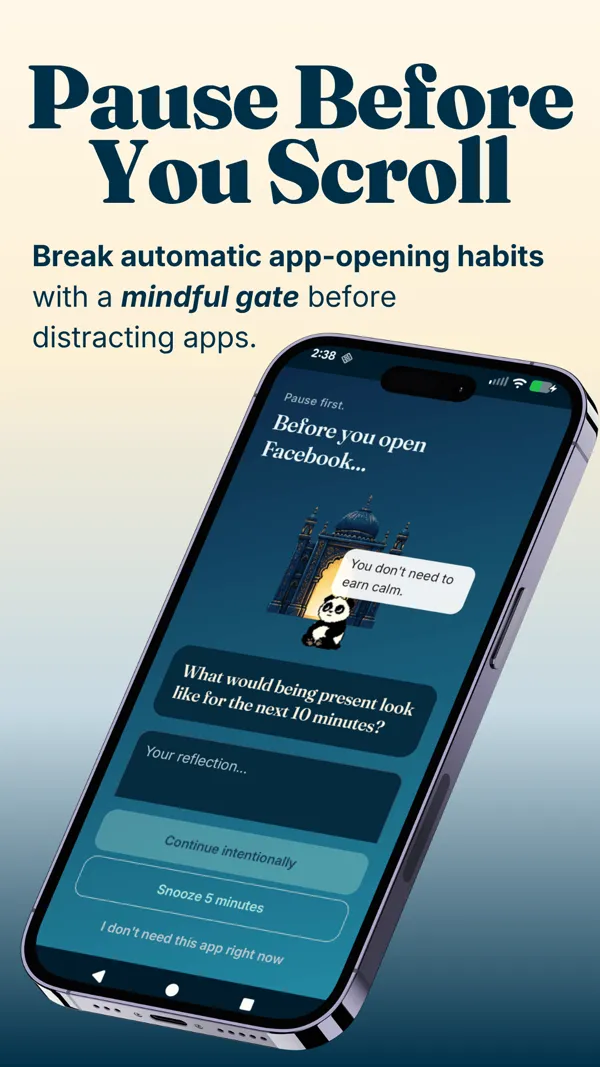
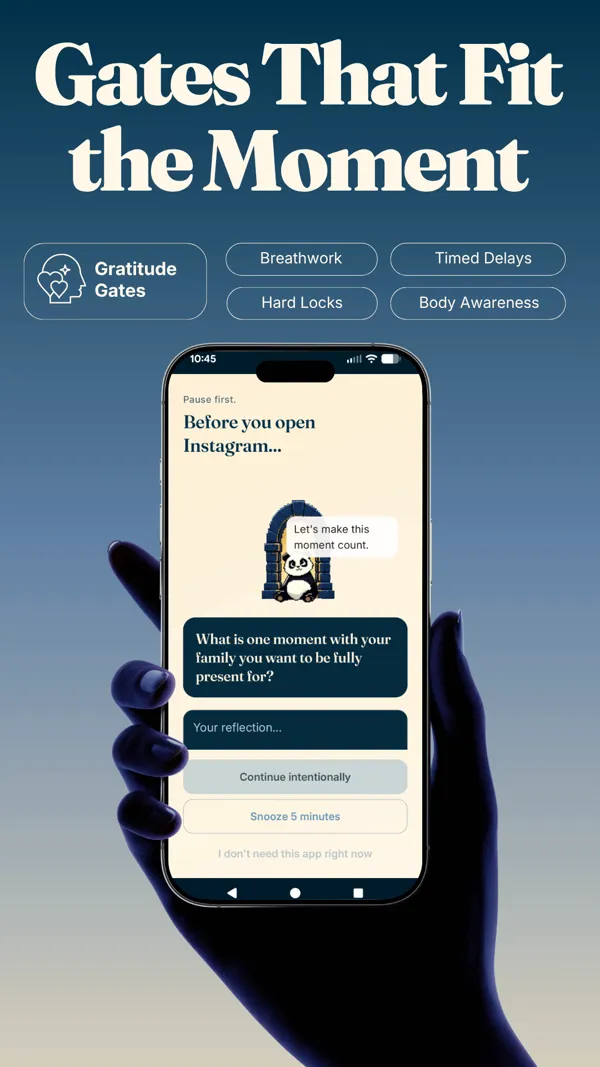
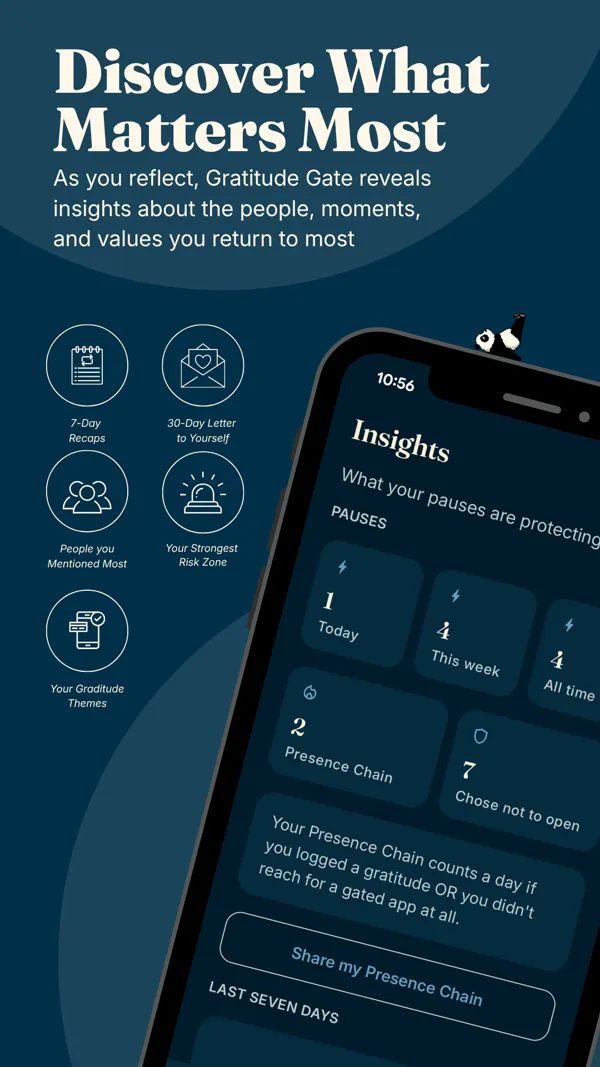
You are on Android and keep extending your own Digital Wellbeing timers. You want the moment of unlock to become a small reflection rather than a dismissed alert. You want the pause to build a gratitude habit, not just show a usage chart. You would rather be gently interrupted than left to honor a soft limit on willpower alone. Android is exactly where Pax Gate lives first.
Feature comparison
| Google Digital Wellbeing | Pax Gate | |
|---|---|---|
| Mechanism | Usage dashboard, app timers, Focus and Bedtime modes | Pause at unlock with a gratitude or mindfulness prompt |
| Ease of ignoring | Tap to extend or dismiss the timer | A short pause you move through intentionally |
| Platforms | Android, built in | Android first (iOS planned) |
| Cost | Free, built into Android | Free to try; paid for the full experience |
| Practice layer | No; awareness dashboard only | Yes (gratitude, prompts, rituals, sanctuary) |
| Companion | No | Yes (Pax the panda) |
| Insights | Usage totals and unlock counts | Mood timeline, triggers, screen time saved |
| Wind-down tools | Yes (Bedtime, grayscale) | Focus is the pause; no grayscale mode |
Best choice by use case
- You want a free awareness dashboard and Bedtime tools: Digital Wellbeing. It is built in and does that well.
- You keep extending your own timers: Pax Gate, whose pause has no dismiss button and acts at the moment of opening.
- You want the moment to build a gratitude habit: Pax Gate, whose practice layer is the point.
- You want grayscale and wind-down specifically: Digital Wellbeing, which has those built in.
- You are on Android and want an intervention, not a chart: Pax Gate. Android is where it lives first, so join the waitlist for early access.
Try Pax Gate on Android
Join the waitlist for early access. Android is exactly the platform Pax Gate is built for, so moving from a dismissible timer to a mindful pause is a direct swap.
Join the Pax Gate waitlist Android first (an iOS version is planned). No platform caveat here; this one is a same-phone swap.Want to compare more than two apps?
The Pax Gate Comparison Tool puts Pax Gate side by side with ScreenZen, Opal, Forest, and One Sec, with an honest verdict for each.
Open the Comparison ToolCompare other alternatives
FAQ
What does Google Digital Wellbeing do well?
It is a solid, free, built-in awareness tool on Android. Its dashboard shows where your time goes by app, your unlock count, and your notification load, which is genuinely useful. It offers app timers, a Focus mode to pause distracting apps, Bedtime mode with grayscale and Do Not Disturb, and notification management. For a free feature that ships with the phone and is aimed at awareness and gentle wind-down, it is well made and worth using.
Why look for a Digital Wellbeing alternative?
Because it was designed for awareness rather than intervention, and it is easy to override. When a timer runs out, you can tap to extend or dismiss it in seconds, and Focus mode can be paused. After a while the timer becomes a notification you swipe away. The dashboard tells you what happened but does nothing to interrupt the reflex. If your habit is reflex-driven and your limits keep getting extended, a pause that acts at the moment of opening usually does more than a dashboard and a soft timer.
How is Pax Gate different from Digital Wellbeing?
Digital Wellbeing is a dashboard with soft timers; Pax Gate is a pause with a purpose. Instead of a chart or a timer you can extend, Pax Gate intercepts the moment you open a chosen app and gives you a small prompt: gratitude, a reflection, a noticing exercise, or a check-in with Pax the panda. There is no add-fifteen-minutes button; there is a short moment that asks something of you and then lets you choose. And because both run on Android, this is a straightforward same-phone swap.
Can I use Pax Gate with Digital Wellbeing at the same time?
You can, and they do slightly different jobs, but for a single app it is usually cleaner to lean on one. Digital Wellbeing's dashboard is a fine awareness layer to keep in the background. For the actual intervention at the moment you open a distracting app, Pax Gate's pause does the work that an easily-extended timer does not. Many people keep the Digital Wellbeing dashboard for awareness and use Pax Gate for the pause that actually changes the reflex.
Is Pax Gate available on Android now?
Pax Gate is Android-first, so Android is exactly the platform it is built for. You can join the waitlist for early access now. This is the one comparison in the set with no platform caveat: both Digital Wellbeing and Pax Gate run on Android, so moving from a built-in dashboard to a mindful pause is a direct swap on the same phone. An iOS version is planned, and iPhone users can join the waitlist for it.
Is Pax Gate free like Digital Wellbeing?
Partly. Digital Wellbeing is entirely free and built into Android, a genuine advantage. Pax Gate is free to try, with a free tier that includes the core pause-at-unlock blocker, and a paid tier for the full experience (themes, prompt packs, sanctuary rooms, rituals, the full journal, and insights). So the pause itself is available without cost, but the practice layer that makes Pax Gate more than a blocker is paid.